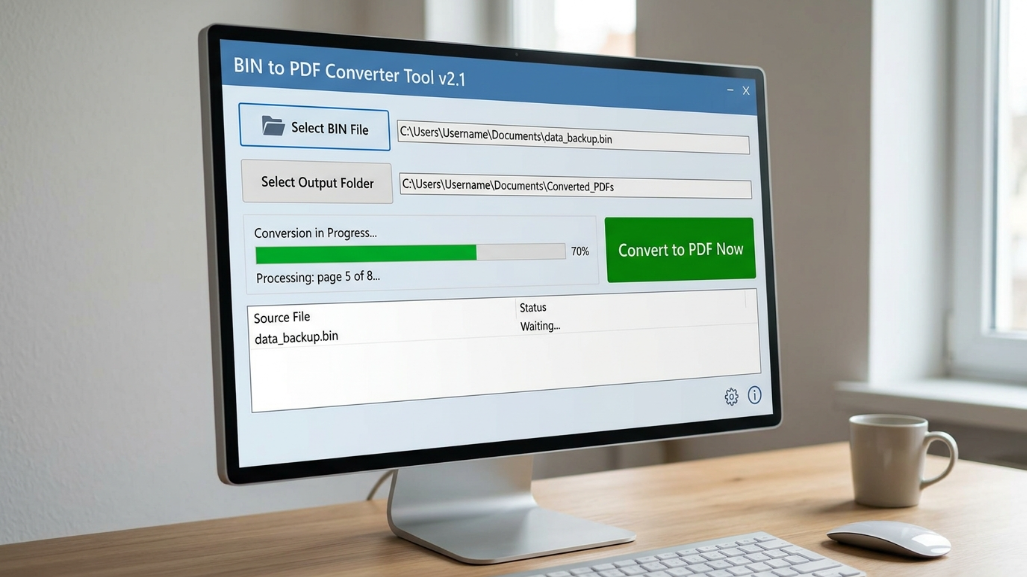
In today's digital ecosystem, file formats play a crucial role in how information is stored, shared, and accessed. Among these, BIN files often present challenges due to their binary nature, making them unreadable without specialized software. On the other hand, PDF files are universally accepted for their readability and compatibility.
This article explores how a BIN to PDF Converter Tool bridges this gap, offering a seamless way to transform complex binary data into accessible, structured documents.
What is a BIN File and Why is It Difficult to Read?
A BIN file, short for binary file, contains raw data stored in binary format. Unlike text-based formats, these files are not meant to be read directly by humans. They are commonly used in:
The primary challenge with BIN files is that they lack a standard structure for readability. Opening them with a regular text editor often results in garbled or unintelligible characters. This limitation creates a need for conversion tools that can interpret and transform the data into a more user-friendly format — such as PDF.
Understanding PDF: The Universal Document Format
PDF, or Portable Document Format, is widely recognized for its consistency across devices and platforms. Developed to preserve document formatting, PDFs ensure that content appears the same regardless of where it is opened.
- Cross-platform compatibility
- Secure sharing with encryption options
- Support for text, images, and multimedia
- Print-ready formatting
What is a BIN to PDF Converter Tool?
A BIN to PDF Converter Tool is a software or online utility designed to convert binary files into readable PDF documents. It works by analyzing the binary structure, extracting interpretable data, and formatting it into a document layout.
These tools are particularly useful for:
- Developers analyzing binary logs
- IT professionals working with firmware
- Digital archivists preserving data
- General users needing readable outputs
The core objective is to make complex binary data accessible without requiring advanced technical expertise.
How BIN to PDF Conversion Works
The conversion process involves these technical steps:
Upload or Input the BIN File
Data Interpretation & Decoding
Content Extraction
Formatting into PDF Layout
Download or Export PDF
This process ensures that even complex binary structures are transformed into human-readable formats efficiently.
Key Features of a High-Quality BIN to PDF Converter
- User-Friendly Interface — A simple and intuitive design ensures that users can convert files without technical expertise.
- High Accuracy Conversion — The tool should accurately interpret binary data without losing critical information.
- Fast Processing Speed — Efficient tools minimize waiting time, even for large files.
- Security and Privacy — Secure tools protect uploaded files through encryption and automatic deletion policies.
- Batch Conversion Support — Advanced tools allow users to convert multiple BIN files simultaneously.
- Compatibility Across Devices — The best tools work seamlessly on desktops, tablets, and mobile devices.
Benefits of Using a BIN to PDF Converter Tool
Enhanced Readability
Binary files are transformed into clear, structured documents, making data easier to understand.
Improved Accessibility
PDF files can be opened on virtually any device, increasing accessibility worldwide.
Better Data Sharing
PDFs are ideal for sharing information professionally without compatibility issues.
Data Preservation
Converting BIN files into PDF helps in long-term data archiving and record keeping.
Time Efficiency
Automated tools save significant time compared to manual binary decoding methods.
Common Use Cases of BIN to PDF Conversion
Software Development
Convert BIN logs into PDF for debugging and documentation.
Digital Forensics
Analyze binary data in a readable format for investigations.
Academic Research
Convert binary datasets into PDFs for analysis and presentation.
IT Administration
Interpret firmware and system data with ease.
Personal Use
Convert downloaded BIN content into readable formats.
Online vs Offline BIN to PDF Converter Tools
| Feature | Online Tools | Offline Software |
|---|---|---|
| Installation Required | ✓ No | ✗ Yes |
| Internet Required | ✗ Yes | ✓ No |
| Usually Free | ✓ Yes | ✗ May Cost |
| Better Data Security | ✗ Varies | ✓ Yes |
| Large File Handling | Limited | ✓ Better |
| Accessible Anywhere | ✓ Yes | ✗ Device Only |
Choosing between online and offline tools depends on your specific needs and the sensitivity of the data you are working with.
Step-by-Step Guide to Convert BIN to PDF
- Choose a reliable BIN to PDF converter tool.
- Upload your BIN file.
- Select conversion settings (if available).
- Click on the "Convert" button.
- Wait for the processing to complete.
- Download the generated PDF file.
Following these steps ensures a smooth and error-free conversion process every time.
Challenges in BIN to PDF Conversion
While conversion tools are powerful, users may encounter certain challenges:
- Data Loss Risks — Improper tools may fail to extract all data accurately.
- Unsupported File Structures — Some BIN files have proprietary formats that are difficult to decode.
- Large File Sizes — Handling large BIN files can slow down the conversion process.
- Security Concerns — Uploading sensitive files to online tools may pose privacy risks.
Tips for Choosing the Best BIN to PDF Converter
- Look for tools with positive user reviews and proven reliability.
- Ensure the tool supports your specific BIN file type and structure.
- Check for clear data privacy and file deletion policies.
- Prefer tools with a preview option before final conversion.
- Test with smaller files before converting large datasets.
Future Trends in File Conversion Technology
AI-Powered Conversion
Artificial Intelligence is improving the accuracy of binary data interpretation significantly.
Cloud Integration
Cloud-based tools offer real-time access and collaboration features for teams.
Enhanced Security
Future tools will include stronger encryption and advanced privacy safeguards.
Multi-Format Support
Modern converters are expanding to support a wider range of binary file formats.
Why BIN to PDF Conversion Matters in the Digital Age
As digital data continues to grow exponentially, the need for accessible and shareable formats becomes increasingly important. BIN files, while powerful, are not user-friendly. Converting them into PDF ensures that information can be easily read and understood, shared across platforms, and preserved for future use.
This transformation plays a critical role in bridging the gap between raw data and human comprehension across industries and use cases.
Conclusion
The BIN to PDF Converter Tool is an essential utility in today's data-driven world. By transforming complex binary files into readable documents, it empowers users across various fields — from developers to researchers — to access, analyze, and share information effectively.
With the right tool, users can overcome the limitations of binary data and unlock its full potential in a structured, professional format. As technology continues to evolve, these tools will become even more powerful, making file conversion faster, safer, and more accurate.
Try Our BIN to PDF Converter Tool
Convert binary files into readable PDF documents instantly with TecByte free online converter. No installation required.
Convert Now